
Overview
The Dialogue Box will display the details of the selected Note or Mission.
You can read the Narrative, Add or Read Comments, access Hyperlinks or see Summary Details on this Dialogue Box.
Note Dialogue Box
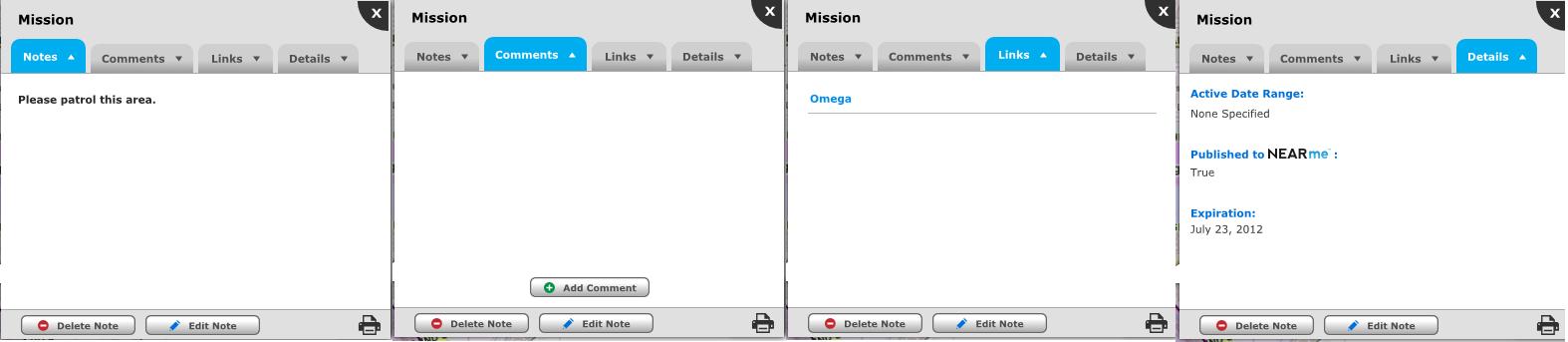
There are four tabs on the Dialogue Box: Notes, Links, Comments and Details.
The Notes tab will display the details of the Note or Mission. This is the text that was entered as the Narrative.
The Links tab will display any external Links that have been added to the Note or Mission.
The Comments tab will display any comments that have been added to the Note or Mission. You can also add Comments from this tab. Depending on your Dashboard's configuration and the Note's settings this tab may not be available.
The Details tab will provide a summary of the Note or Mission. You can see the Active Date Range and Expiration Date. If you are a NEARme client you can also see if it is a Mission that has been published to NEARme.
You can Edit or Delete the Note with the corresponding buttons on the bottom of the dialogue box. They will display at the bottom of each tab. Depending on your User permissions these may not be available.
The Print button will allow you to Print the Note or Mission.
From left to right: The Notes Tab of the Note Details Dialogue Box, the Links Tab and the Comments Tab.
Related Links:
